


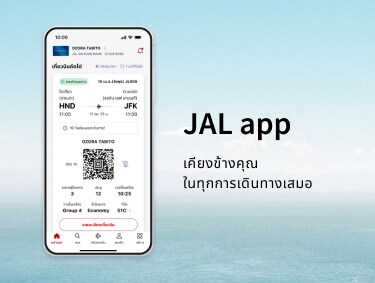
JALアプリ 旅をとなりで支えるアプリ

iOS


Android


Notice
Currently, there are some glitches in our system. For more information, please check the details below.

ดีไซน์ที่เรียบง่ายและใช้งานสะดวก ซึ่งออกแบบมาเพื่อให้ทุกคนเข้าใจได้ง่าย ใช้งานง่ายและราบรื่น
ประสบการณ์การใช้งานที่ไร้กังวลสำหรับผู้เดินทางมือใหม่และผู้ที่เดินทางบ่อย
สิ่งที่คุณต้องการ ในยามที่คุณต้องการ แอป JAL ใหม่พร้อมให้คุณใช้งานแล้ว
การเดินทางครั้งต่อไปของคุณอยู่ใกล้แค่ปลายนิ้วด้วยแอป JAL คุณจะไปเที่ยวที่ไหนต่อ?
ฟีเจอร์หลัก ๆ ของแอป JAL
สำรวจ วางแผน และจอง — ทำทุกอย่างได้ในที่เดียว

แอป JAL จัดการให้ได้ครบทุกอย่าง ไม่ว่าจะเป็นการค้นหาแรงบันดาลใจในการเดินทาง การสำรวจจุดหมายปลายทาง การจองเที่ยวบินและการสำรองที่นั่งของคุณ
เห็นภาพการเดินทางของคุณได้ก่อนออกเดินทาง

ตรวจดูเมนูบนเครื่องบิน เวลาให้บริการอาหาร และความพร้อมให้บริการของ Wi-Fi
จินตนาการภาพการใช้เวลาบนเครื่องล่วงหน้า เพื่อการเดินทางที่ราบรื่นและไร้กังวล
ข้อมูลเที่ยวบินแบบเรียลไทม์ในมือคุณ

ดูข้อมูลสรุปทุกอย่างที่คุณต้องทราบเกี่ยวกับการขึ้นเครื่องได้ ซึ่งรวมไปถึงการแจ้งเตือนแบบพุชสำหรับการเปลี่ยนแปลงประตูขึ้นเครื่องหรือความล่าช้าแบบเรียลไทม์
แอปจะแนะนำคุณในทุกขั้นตอน เพื่อให้คุณรับทราบข้อมูลอยู่เสมอ
เชื่อมต่อแบบเหนือเมฆได้เสมอ

ทำการเชื่อมต่อ Wi-Fi บนเครื่องบินได้ง่ายกว่าที่เคยด้วยแอป JAL
ไมล์และสถานะของคุณที่อัปเดตอยู่เสมอ

ติดตามไมล์สะสม คะแนนสถานะ Life และการเดินทางแบบเหนือระดับได้อย่างง่ายดาย
ประกาศและคำแนะนำ
โปรดอัปเดตเป็นเวอร์ชันล่าสุด
เราขอแนะนำให้อัปเดตแอปของคุณเป็นเวอร์ชันล่าสุดเพื่อให้คุณใช้งานได้อย่างราบรื่น
สภาพแวดล้อมที่แนะนำ
- iOS:iPhone ที่ใช้ OS 15.0 หรือรุ่นใหม่กว่า
- Android:OS 11.0 หรือรุ่นใหม่กว่า
- เมื่อเปลี่ยนจากแอป JAL ไปยังเว็บไซต์ JAL การดำเนินการจะสอดคล้องกับสภาพแวดล้อมที่แนะนำสำหรับเว็บไซต์ JAL (เว็บไซต์มือถือ)

การแจ้งเตือน
ประเภทของการแจ้งเตือน เปิด
การตั้งค่าการแจ้งเตือน เปิด
คำถามที่พบบ่อย
คำถามที่พบบ่อย: เกี่ยวกับแอป JAL
คำแนะนำแอป JAL สำหรับบริการแต่ละอย่างและรายละเอียด
เที่ยวบินภายในประเทศ * เปิด
* บริการสำหรับเที่ยวบินภายในประเทศญี่ปุ่น
เที่ยวบินระหว่างประเทศ เปิด
การเข้าสู่ระบบและข้อมูลสมาชิก เปิด
Details Regarding Technical Issues
For customers experiencing technical issues, please refer to the "Recommended Action" in the table below until the service is fully restored.
We appreciate your patience and cooperation.
Confirmed reservations are not appearing in the app. (Domestic and International flights)
Affected Customers
Customers who meet any of the following conditions:
- [Resolved] Customers who have 10 or more flight records (including flights flown within the past 2 days).
→ Please update the JAL app to the latest version (6.1.0 or higher) from the iOS App Store or Google Play Store. - Customers with reservations for award tickets on JAL-operated flights booked through other airlines, where the mileage account holder and the actual passenger are different.
Recommended Action
Please check your booking details via the "Manage Booking" section on the JAL website.
Completed flights may remain displayed on the app's Home screen. (Domestic and International flights)
Affected Customers
Customers who traveled on flights that experienced delays of 30 minutes or more, or flights operated under special conditions.
Recommended Action
Due to current app specifications, flights may remain on the Home screen for approximately two days after arrival.
When boarding your next flight, please manually select the correct flight from the Home screen or "My Trips" list.
Seat status may incorrectly display as "Not Assigned," even if a seat has already been selected. (International flights)
Affected Customers
Customers with reservations for flights operated by other airlines (flight numbers starting with an airline code other than "JL"), where the ticket was purchased through an entity other than JAL.
Recommended Action
Please verify your actual seat assignment status through the original point of purchase or the "Manage Booking" section on the JAL website.
