


Google Wallet app for Android
Google’s Google Wallet app lets you manage all of your boarding passes in one place.
You can also scan your smartphone at an airport reader for quick and easy boarding.
How to register a Pass
From JAL app
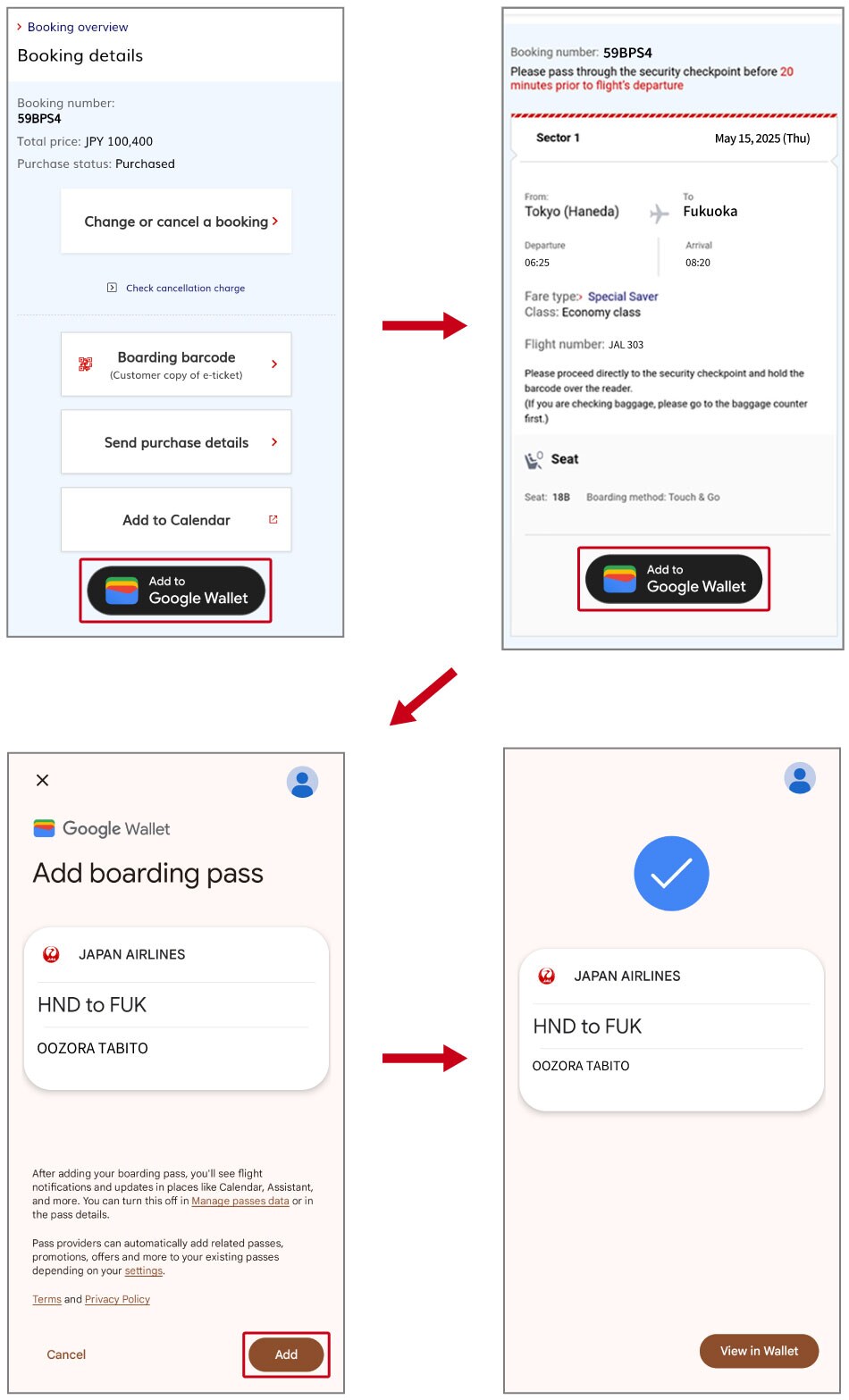
Please open the "Flight details" screen for the relevant flight.
Tap "Add to Google Wallet" on the "Flight details" screen and add your boarding pass to complete the process.

Please note that if you make changes to your booking after registering it in Google Wallet, the registration will not automatically be updated. You will need to re-register.
On the Booking details page
Tap the "Add to Google Wallet" button on the "Booking details" page on the JAL Web site (mobile), and then tap the "Add to Google Wallet" button on the barcode page for each flight (segment).
How to use a Pass
STEP1 Launch the app

Launch the Google Wallet app.
STEP2 Select your flight

Tap the "Passes" menu in the Google Wallet app and select the flight from your registered Passes.
STEP3 2D barcode
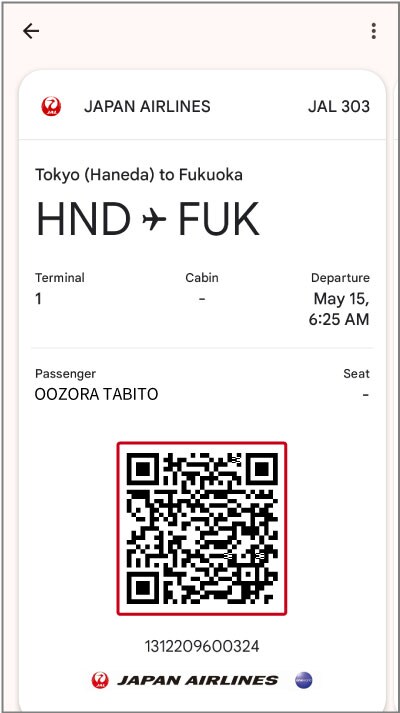
A 2D barcode will be displayed.
Boarding method
Touch the boarding barcode to the readers at the airport security checkpoint and boarding gate.
For more details on boarding, please refer to the JAL Touch & Go boarding information page.

Important notes
- The 2D barcode contains important information about your ticket. Please be sure to keep it in a safe place until you finish your trip. JAL cannot be held responsible for any losses incurred due to unauthorized use or other causes.
- Each flight (segment) requires a separate Google Wallet registration.
- Please note that if you make changes to your booking after registering it in Google Wallet, the registration will not automatically be updated. You will need to re-register.
- Passes are not automatically deleted after boarding. You will need to delete them manually.
- The 2D barcode may not be readable if there is a protective film on the LCD screen.
- This service is not available for certain domestic segments included in international routes.
- If you are unable to register normally through the JAL app, please update to the latest version of the app and try again.
How to register a Pass
STEP1 Tap "Online Check-in" for international flights
〔Web〕Tap "Online Check-in" for international flights

Tap "Online Check-in" for international flights under "Boarding/check-in" on the JAL mobile website.
〔JAL app〕Tap the Home screen (Online Check-in Not Complete).

You can also access it from the (Incomplete Online Check-in) section on the “Flight details” and “My Trips” screens.
STEP2 Tap "Mobile Boarding Pass (Using Google Wallet)".

After completing Online Check-in, tap "Mobile Boarding Pass (Using Google Wallet)" on the "Issue boarding pass" page.
STEP3 Tap "Save to Phone"

Tap the "Save to Phone" button located below the mobile boarding pass to proceed to the save page.
STEP4 Boarding pass saved

Tap the "Save" button to save the boarding pass.
- Each flight (segment) requires a separate Google Wallet registration.
- Google Wallet can be used for JAL Group-operated flights.
- Please note that if you make changes to your booking after registering it in Google Wallet, the registration will not automatically be updated. You will need to re-register.
How to use a Pass
STEP1 Launch the app

Launch the Google Wallet app.
STEP2 Select your flight

Tap the "Passes" menu in the Google Wallet app and select the flight from your registered Passes.
STEP3 2D barcode

A 2D barcode will be displayed.
Boarding method

When you select your seat, check in (via Online Check-in), and issue your boarding pass on the JAL website, you can board your flight without having to check in at the airport on the day of departure.
Please see Online Check-in page for international flights for details on eligible airports and terms of use.
Important notes
- The 2D barcode contains important information about your ticket. Please be sure to keep it in a safe place until you finish your trip. JAL cannot be held responsible for any losses incurred due to unauthorized use or other causes.
- Each flight (segment) requires a separate Google Wallet registration.
- Google Wallet can be used for JAL Group-operated flights.
- Please note that if you make changes to your booking (including seat changes) after registering it in Google Wallet, the registration will not automatically be updated. You will need to re-register.
- Passes are not automatically deleted after boarding. You will need to delete them manually.
- The 2D barcode may not be readable if there is a protective film on the LCD screen.
- This service may not be available at certain departure airports or under certain other conditions. For more information, please see Online Check-in page for international flights.
Supported devices
Android smartphones with Android 5.0 or higher that support the Google Wallet app
- iOS devices such as iPhone and iPad are not supported.
How to download
Google Wallet is an app that lets you manage all of your boarding passes, coupons, credit cards, etc. in one place.
- Google Wallet and Android are trademarks of Google LLC.