


LOPPI operating procedure
The multimedia terminal in the convenience store is only available in Japanese. Please follow the steps below to complete your payment.
STEP1
STEP4
STEP1 LOPPI home screen

Please select "各種番号をお持ちの方 (For various types of codes)" button.
STEP2 Search for payment details

Please enter the "お客様番号 (Customer number) (11-digit)" displayed on the payment information page, excluding hyphens and select the "次へ (Next)" button.

Please enter the "確認番号 (Confirmation number) (5971)" displayed on the payment information page and select the "次へ (Next)" button.
STEP3 Review application data entered

Review the information entered and select the "はい(OK)" button to confirm.
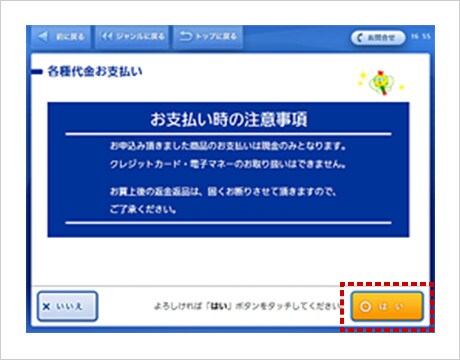
Review the notes (payment is accepted by cash only) and select the "はい(OK)" button.
STEP4 Issue payment slip
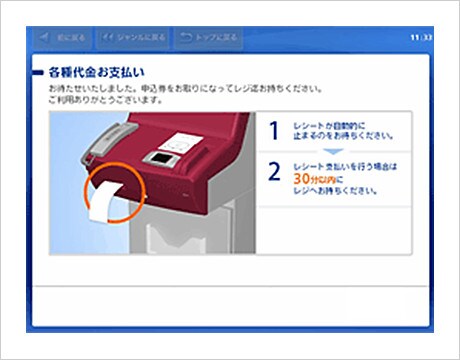
Please bring your payment slip to the cash register and complete the payment within 30 minutes.
After making payment, please hold on to the "払込受領証・お客様へのご案内 (payment receipt for customer)" until you board your flight.
- Refunds are not permitted at the store once the payment has been made.
STEP1
STEP2
STEP4
STEP1 LOPPI home screen

Please select "Loppi専用コードをお持ちの方 (For those with Loppi-exclusive code)" button.
STEP2 Scan the barcode

Please hold the “ローソン・ミニストップ専用2次元バーコード (Lawson/Ministop-exclusive QR code)” displayed on the payment information page up to the Loppi's QR reader.
STEP3 Review application data entered

Review the information entered and touch the "はい(OK)" button to confirm.
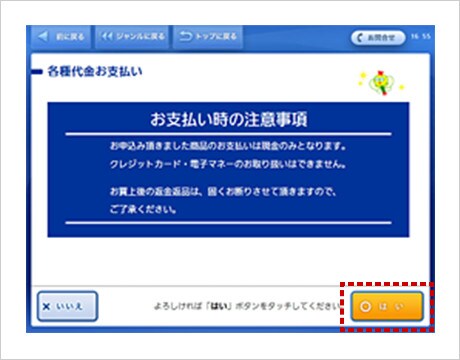
Review the notes (payment is accepted by cash only) and touch the "はい(OK)" button.
STEP4 Issue payment slip
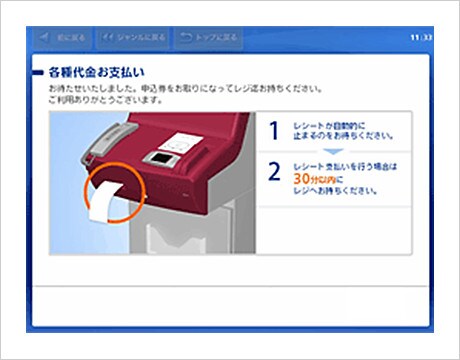
Please bring your payment slip to the cash register and complete the payment within 30 minutes.
After making payment, please hold on to the "払込受領証・お客様へのご案内 (payment receipt for customer)" until you board your flight.
- Refunds are not permitted at the store once the payment has been made.