
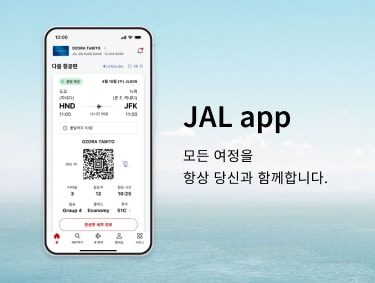
JALアプリ 旅をとなりで支えるアプリ

iOS

App Store 2D barcode

Android

Google Play 2D barcode

Notice

After 17:00 (JST) on Wednesday, April 15, 2026, the new JAL app will be available by updating to version v6.0.0 via the iOS or Android app stores. (Please note that there may be a delay before the update appears in the store depending on your device.)

Currently, there are some glitches in our system. For more information, please check the details below.

JAL app 2026년 4월 15일 리뉴얼 오픈

누구나 이해할 수 있도록 제작된 간결하고 심플한 디자인. 안정적이고 손쉬운 사용성.
초보 여행자도, 자주 여행하는 분들도 모두 편안하게 이용 가능.
필요한 것을 필요할 때 제공하는 새로운 JAL 앱이 이제 시작됩니다.

JAL 앱만 있으면 다음 여행이 단 몇 번의 터치로 가까워집니다. 다음은 어디로 떠나시겠어요?

JAL 앱의 주요 기능

여행 탐색부터 계획, 예약까지, 한 곳에서 간편하게.

여행 탐색부터 계획, 예약까지, 한 곳에서 간편하게.

여행 아이디어를 얻고 목적지를 탐색하는 것부터 항공편 예약과 좌석 선택까지, JAL 앱에서 모든 것을 간편하게 처리하세요.

비행 전에 여행의 모습을 미리 떠올려보세요.

비행 전에 여행의 모습을 미리 떠올려보세요.

기내식 메뉴, 기내식 서비스 시간, WiFi 이용 가능 여부를 미리 확인할 수 있습니다.
기내에서의 시간을 미리 그려보며, 스트레스 없는 편안한 비행을 즐겨보세요.

손쉽게 확인할 수 있는 실시간 항공편 정보.

손쉽게 확인할 수 있는 실시간 항공편 정보.

게이트 변경이나 지연에 대한 실시간 푸시 알림 등 탑승에 필요한 모든 정보를 한눈에 볼 수 있습니다.
앱이 단계마다 안내해 주기 때문에 필요한 정보를 항상 파악할 수 있습니다.

구름 위에서도 온라인 상태 그대로.

구름 위에서도 온라인 상태 그대로.

JAL 앱을 사용하면 기내 WiFi에 쉽게 연결할 수 있습니다.

항상 최신 상태의 마일리지와 등급 정보.

항상 최신 상태의 마일리지와 등급 정보.

마일리지, Life Status 포인트, 다음 등급까지의 진행 상황을 쉽게 확인하세요.

공지 및 권고 사항

최신 버전으로 업데이트하십시오

원활한 이용을 위해 앱을 최신 버전으로 업데이트할 것을 권장드립니다.

권장 환경

  • iOS: OS 15.0 이상이 설치된 iPhone
  • Android: OS 11.0 이상
  • JAL 앱에서 JAL 웹사이트로 전환하는 경우, JAL 웹사이트(모바일 사이트)의 권장 환경에 따라 운영됩니다.

알림

자주 묻는 질문

자주 묻는 질문: JAL 앱 정보

각 서비스 및 세부 정보에 대한 JAL 앱 안

Details Regarding Technical Issues

For customers experiencing technical issues, please refer to the "Recommended Action" in the table below until the service is fully restored.
We appreciate your patience and cooperation.

Confirmed reservations are not appearing in the app. (Domestic and International flights)

Affected Customers
Customers who have 10 or more flight records (including flights flown within the past 2 days).
Recommended Action
Please check your booking details via the "Manage Booking" section on the JAL website.

Completed flights may remain displayed on the app's Home screen. (Domestic and International flights)

Affected Customers
Customers who traveled on flights that experienced delays of 30 minutes or more, or flights operated under special conditions.
Recommended Action
Due to current app specifications, flights may remain on the Home screen for approximately two days after arrival.
When boarding your next flight, please manually select the correct flight from the Home screen or "My Trips" list.

A pop-up regarding the acquisition of personal information appears every time you navigate from the JAL app to the website.

Affected Customers
Customers navigated to the JAL website from JAL app
Recommended Action
Please update the JAL app to the latest version (v6.0.3 or higher) from the iOS or Android app stores.

  • Note for Android users :
    Despite this update, the issue where the popup reappears when navigating to our website after restarting the app (e.g., by swiping up to close it) remains unresolved.
    If the popup is displayed, please tap "Confirm" each time.

Seat status may incorrectly display as "Not Assigned," even if a seat has already been selected. (International flights)

Affected Customers
Customers with reservations for flights operated by other airlines (flight numbers starting with an airline code other than "JL"), where the ticket was purchased through an entity other than JAL.
Recommended Action
Please verify your actual seat assignment status through the original point of purchase or the "Manage Booking" section on the JAL website.